


Podcast
ChatGPT: Exploring AI Capabilities and Future Developments
Explore the capabilities of ChatGPT and the future of generative AI. Learn how OpenAI’s large language models are transforming artificial intelligence today.

00:00
00:00
GPT Image 2 delivers near-perfect text rendering, 4K resolution, and reasoning-powered generation. See our hands-on comparison with SeeDream, Nano Banana 2, and more.

GPT Image 2 is OpenAI's most advanced image generation model, launched on April 21, 2026, as part of ChatGPT Images 2.0. It replaces DALL-E 3 and GPT Image 1.5 with near-perfect text rendering, 4K resolution output, and reasoning-powered generation natively built into ChatGPT's GPT-5.4 backbone. Whether you need product mockups, infographics, or creative artwork, GPT Image 2 delivers results that previous models simply could not.
If you want to understand the AI revolution powering tools like GPT Image 2, BeFreed turns the best AI books into bite-sized summaries and podcasts — so you can stay ahead without reading 400-page textbooks.
GPT Image 2 is OpenAI's next-generation image generation model, officially released on April 21, 2026. It is natively integrated into ChatGPT, powered by the GPT-5.4 backbone, replacing both DALL-E 3 and the interim GPT Image 1.5 model.
Unlike its predecessors, GPT Image 2 does not treat image generation as a separate module. Instead, it uses the same reasoning pipeline as ChatGPT's text capabilities — meaning it can "think" about what you want before generating, search the web for reference if needed, and even self-check its outputs for accuracy.
The model is available to ChatGPT Plus, Team, and Enterprise subscribers through the ChatGPT interface, with API access rolling out to developers. Third-party platforms like fal.ai also offer API access with competitive pricing starting at approximately $0.01 per image for standard quality.
Text rendering has been the Achilles' heel of AI image generation for years. GPT Image 2 solves this with approximately 99% character-level accuracy on labels, UI elements, signage, and business cards. It handles multilingual text natively — Latin, Chinese, Japanese, Korean, Hindi, and Bengali scripts all render correctly within images.
This is not an incremental improvement. Previous models routinely garbled phone numbers, misspelled names, and produced unreadable small text. GPT Image 2 renders crisp, correctly-spelled copy even in dense compositions like infographics, product packaging, and UI mockups.
GPT Image 2 outputs images at up to 4096×4096 pixels with custom aspect ratios, roughly 2x faster than GPT Image 1.5. The photorealism is state-of-the-art — fine-grained details like fabric textures, skin pores, reflections, and depth of field are rendered with a quality that previous models could not match.
The model also excels at product photography, architectural visualization, and editorial-style images where photographic accuracy is essential.
GPT Image 2 handles subtle stylistic instructions with precision. You can request specific art styles — pixel art, manga, film stills, watercolor, oil painting, cyberpunk aesthetic — and the model delivers faithful interpretations rather than generic approximations.
The model also preserves the "characteristic features of photos" according to OpenAI, meaning it better captures what makes a photograph look like a photograph versus what makes an illustration look like an illustration. This applies to fine-grained elements like iconography, UI elements, dense compositions, and typography.
One of GPT Image 2's most practical features is context-aware multi-turn editing. You can generate an image, then ask ChatGPT to modify specific elements — "change the background to sunset," "remove the person on the left," "make the text larger" — and it will preserve everything else while applying your changes.
The model supports adding, subtracting, combining, blending, and transposing elements. In one demonstration, OpenAI showed the system generating eight different summer outfits from a single uploaded image while maintaining character consistency across all variations.
With thinking mode enabled, ChatGPT Images 2.0 can generate up to eight images at once from a single prompt, with characters, objects, and styles staying consistent across all frames.
GPT Image 2 introduces a fundamentally new approach: it reasons before generating. The model uses ChatGPT's chain-of-thought capabilities to plan the image composition, check spatial relationships, and verify text accuracy before producing pixels.
This reasoning step also enables web search integration — the model can look up real-world references, logos, or brand guidelines to produce more accurate results. It can also self-check outputs and regenerate if something looks wrong.
To move beyond marketing claims, I ran the same prompts through three different image generation models using their native APIs. Here is what I found.
I asked each model to generate a modern infographic for the BeFreed podcast episode "ChatGPT is becoming an AI super app," featuring the episode title, four topic icons with labels (Reasoning, Visual Intelligence, Autonomous Agents, Productivity), and "Listen on BeFreed" at the bottom.
Explore the capabilities of ChatGPT and the future of generative AI. Learn how OpenAI’s large language models are transforming artificial intelligence today.
GPT Image 2 result:
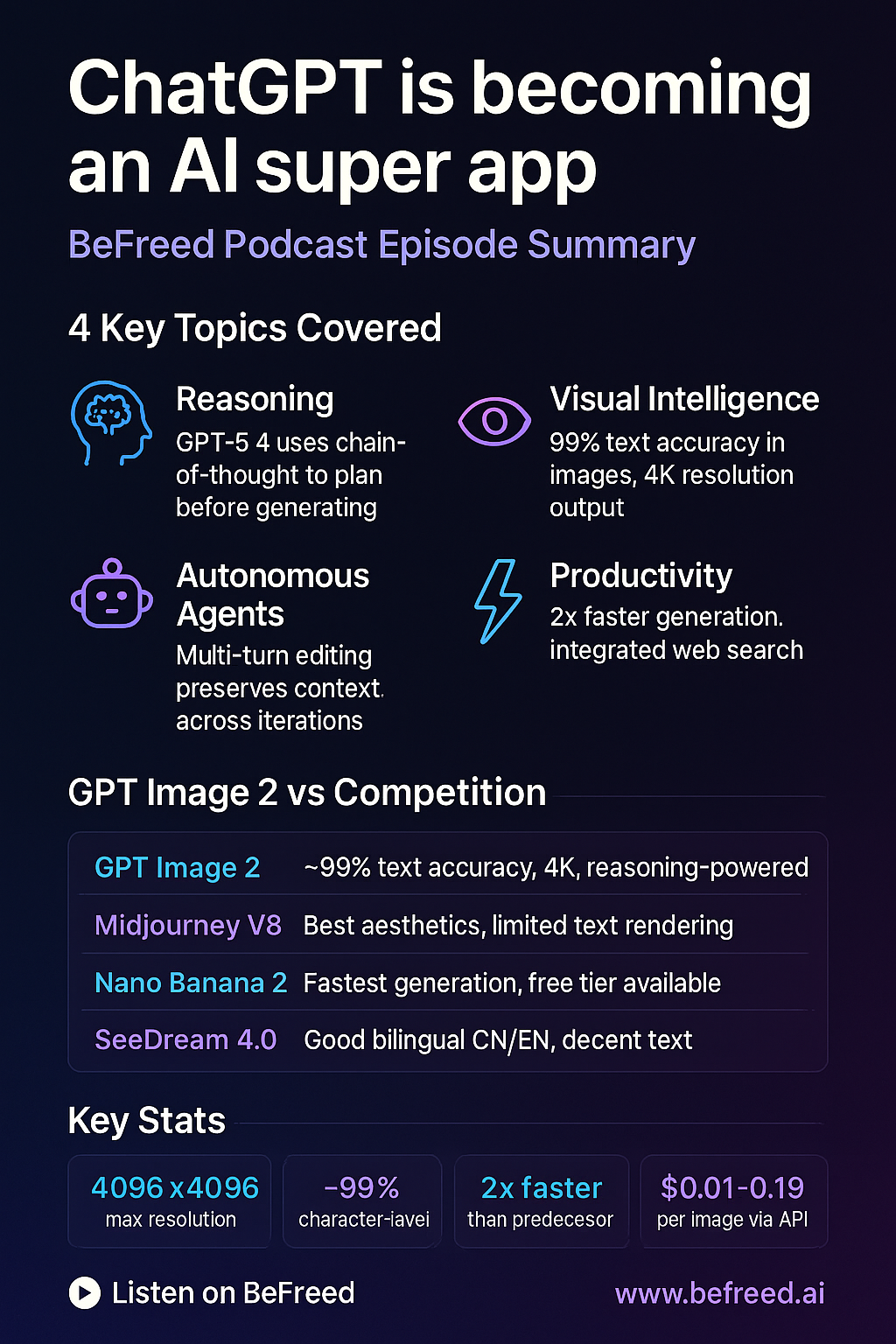
GPT Image 2 nailed it. Every word is perfectly spelled, the layout is polished with a dark gradient and neon accents, all four topic icons have correct labels, and "Listen on BeFreed" renders cleanly at the bottom. It even included the OpenAI logo in context.
GPT Image 1.5 (predecessor) result:
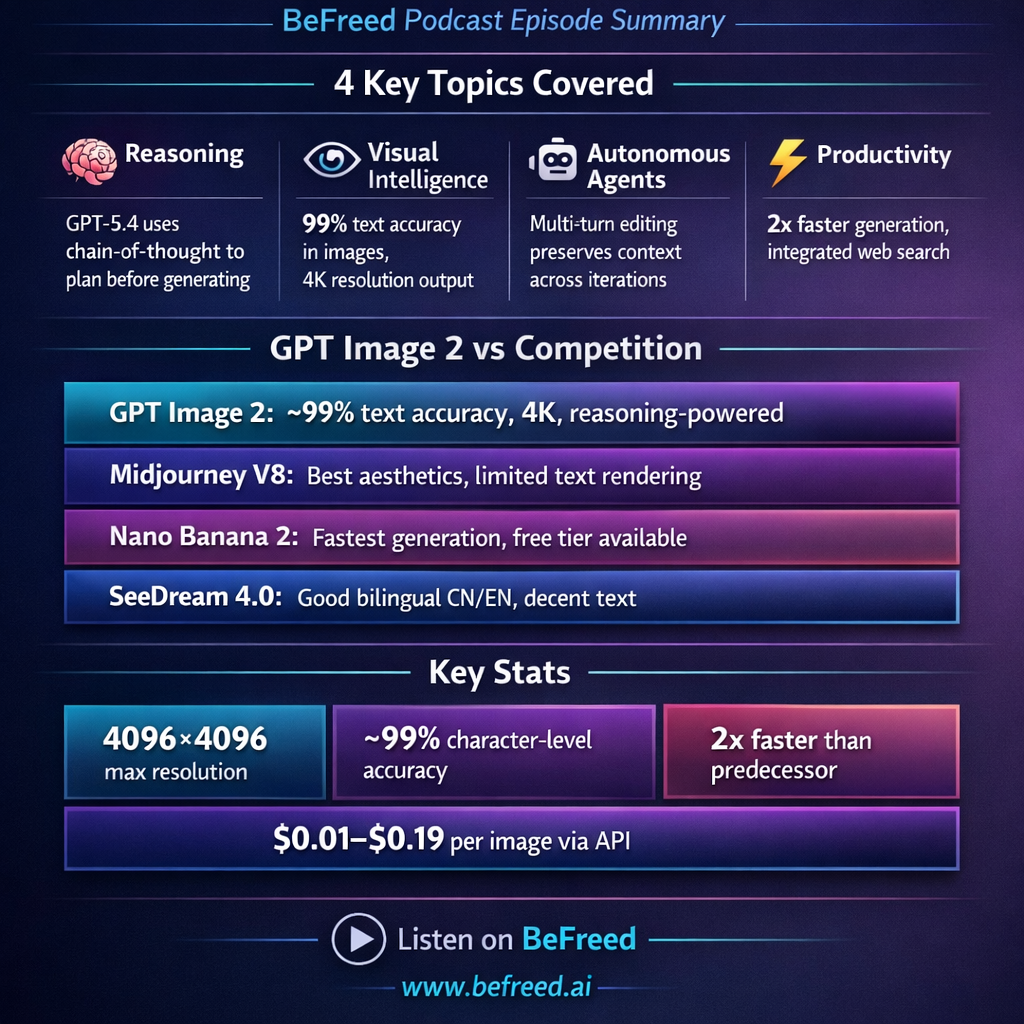
GPT Image 1.5 produced a more cluttered layout with mixed font colors and a busier composition. The text is readable but less polished, and the overall design feels less intentional.
SeeDream 4.0 result:
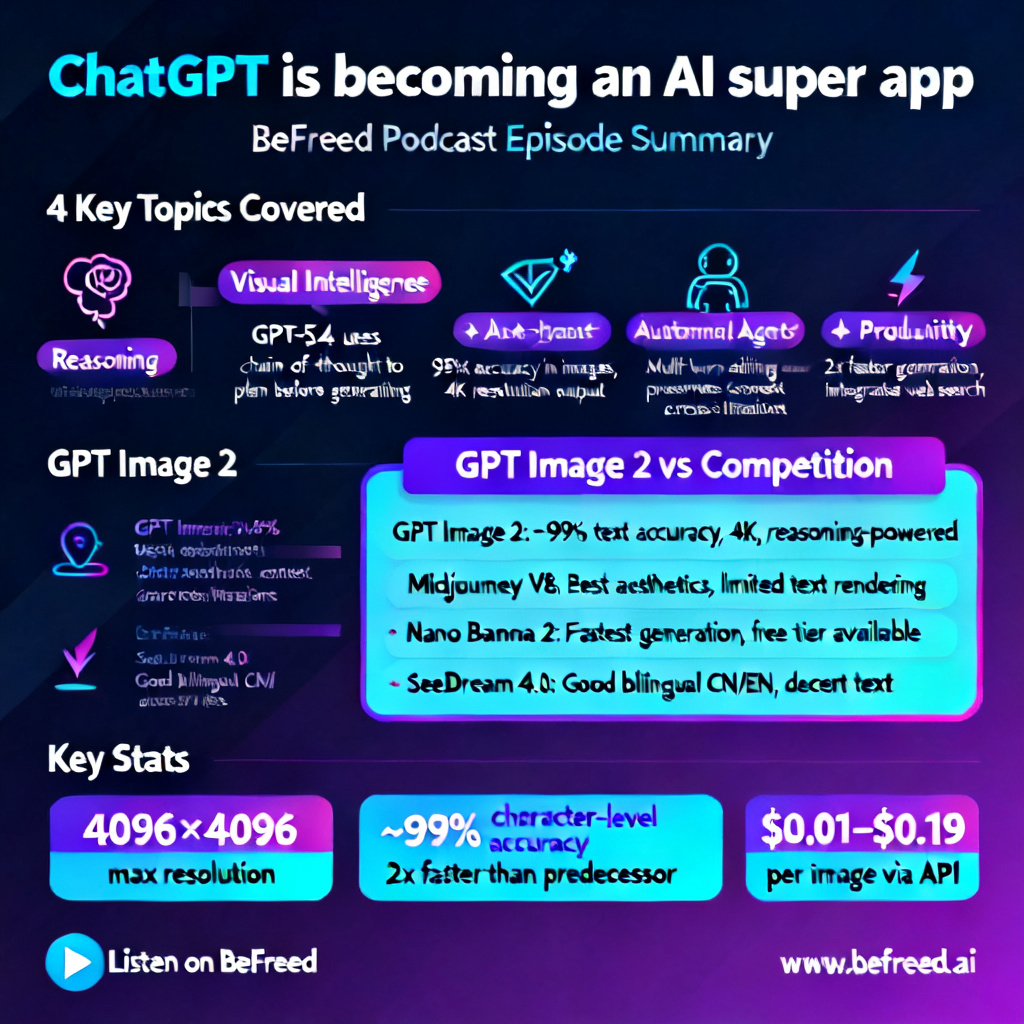
SeeDream 4.0 produced a clean, minimalist design — but misspelled "Autonomous" as "Autonimous." It also dropped the fourth topic entirely and missed the "Listen on BeFreed" text. The aesthetic is pleasant, but the text accuracy gap is obvious.
For the second test, I asked each model to generate a professional business card for "Freedia," BeFreed's AI learning assistant, with specific text including the name, title, company, phone number, and email address.
GPT Image 2 result:
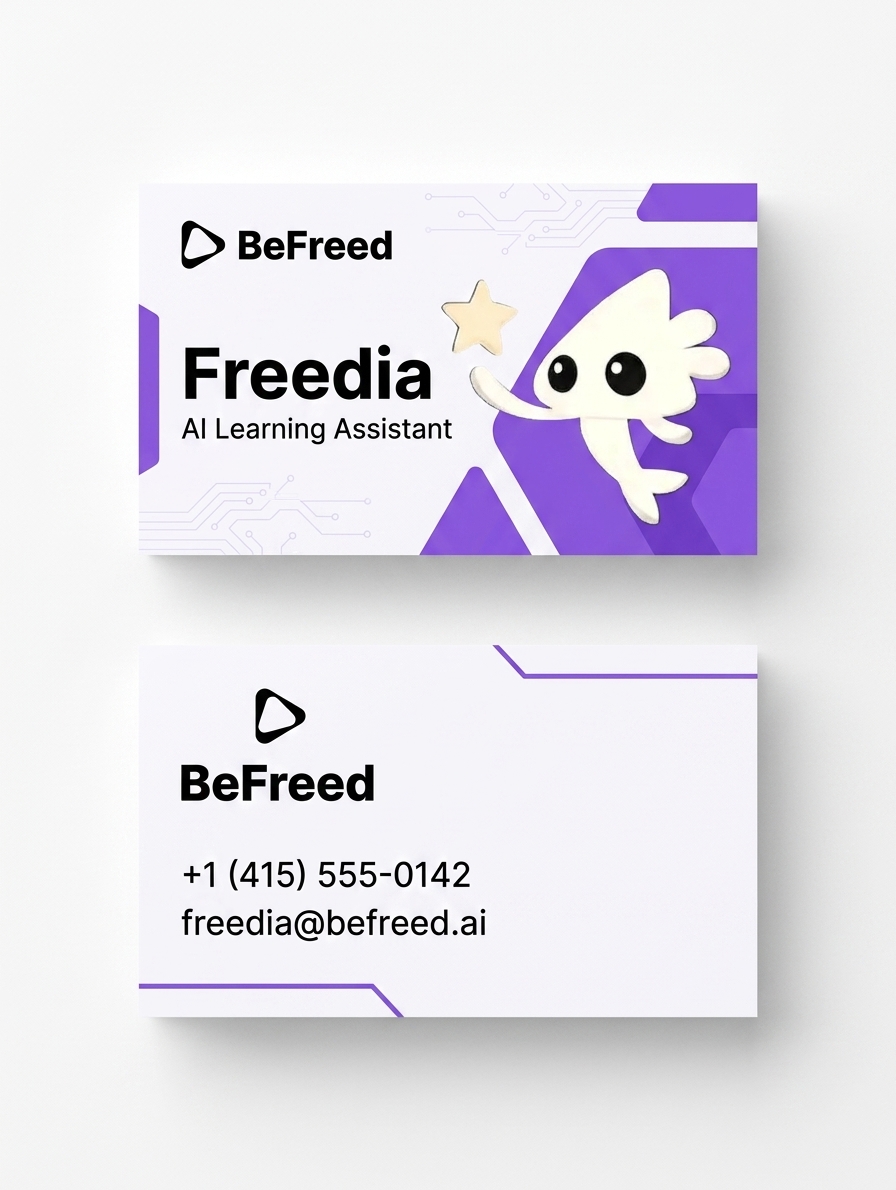
GPT Image 2 generated a professional two-sided business card design with the correct BeFreed triangular play-button logo and Freedia mascot. Every piece of text — the name "Freedia," the title "AI Learning Assistant," the company "BeFreed," the phone number, and the email "freedia@befreed.ai" — rendered perfectly. The purple and white color scheme is clean and cohesive, with the Freedia character peeking from behind a purple accent panel.
GPT Image 1.5 (predecessor) result:
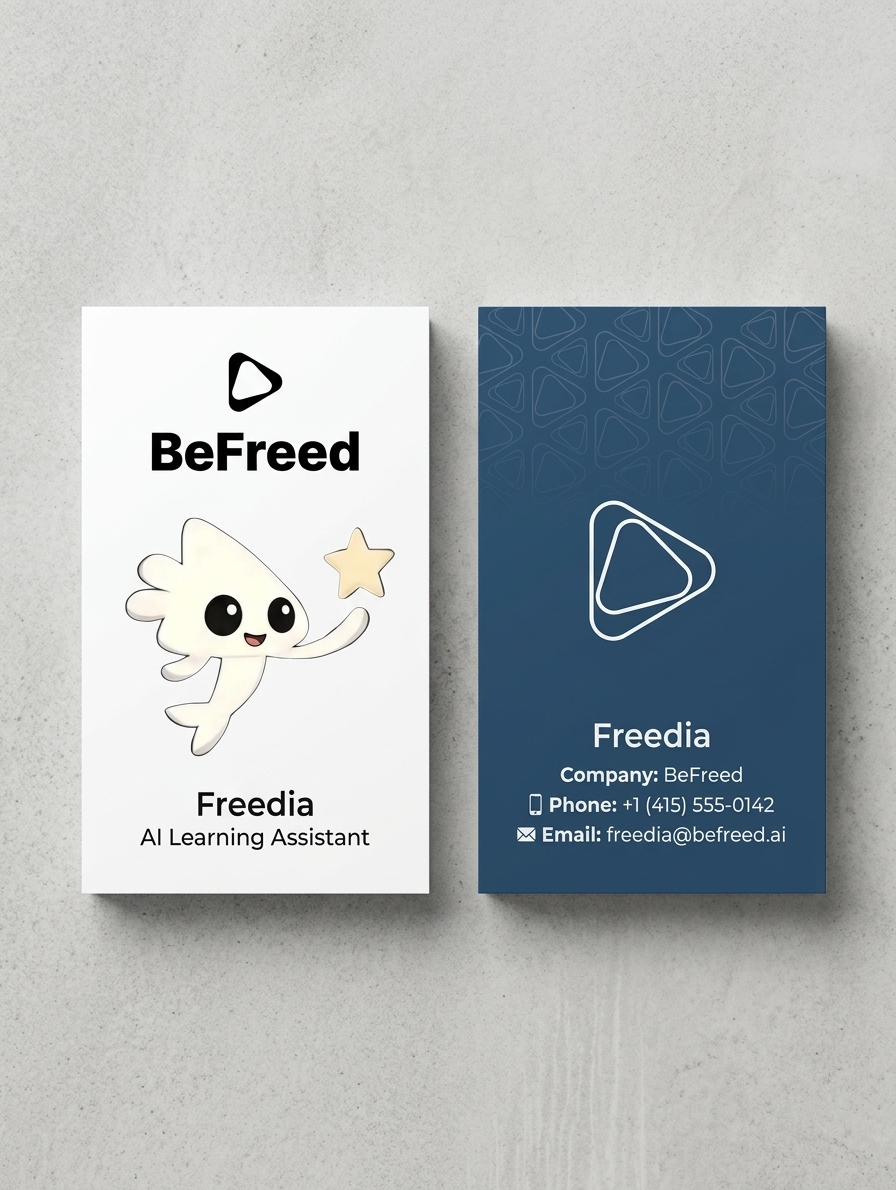
GPT Image 1.5 produced a polished vertical card with the BeFreed triangular logo, Freedia mascot, and accurate contact details. The front features a clean white layout while the back uses a dark blue theme with a pattern of triangular logos. However, the overall composition uses mixed font styles (some italic) and the text hierarchy is less refined than GPT Image 2's version.
SeeDream 4.0 result:
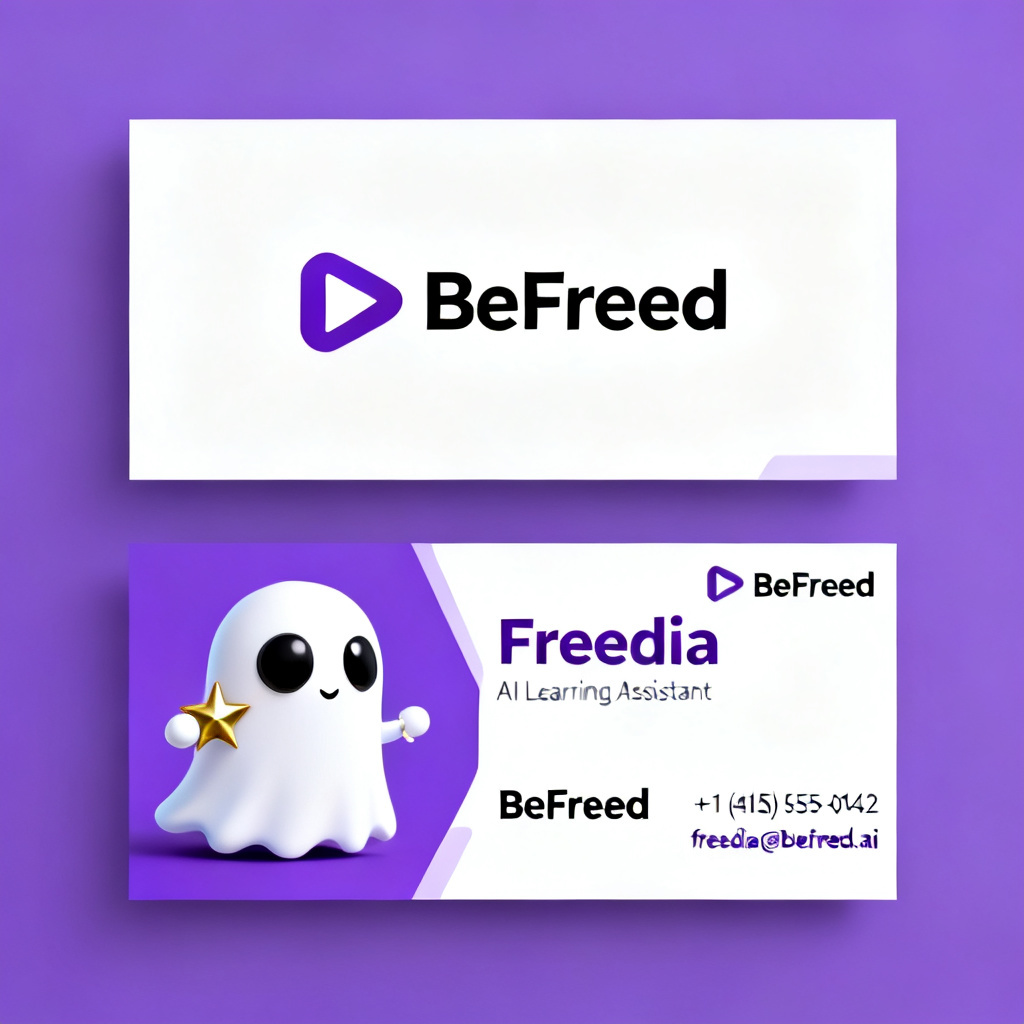
SeeDream 4.0 produced a recognizable business card with a Freedia-like mascot and BeFreed branding in purple. The triangular logo is reproduced well, but some of the contact text on the back appeared in a handwriting-like font rather than clean print. The Freedia character is rendered as a rounder ghost shape rather than the precise original. The design shows both sides but lacks the polished typography of GPT Image 2.
For the third test, I pushed the models into anime art territory — a Genshin Impact style game poster featuring character "Nahida" with specific title text, character name, and version info. This tests both artistic style fidelity and text rendering in a creative context.
GPT Image 2 result:
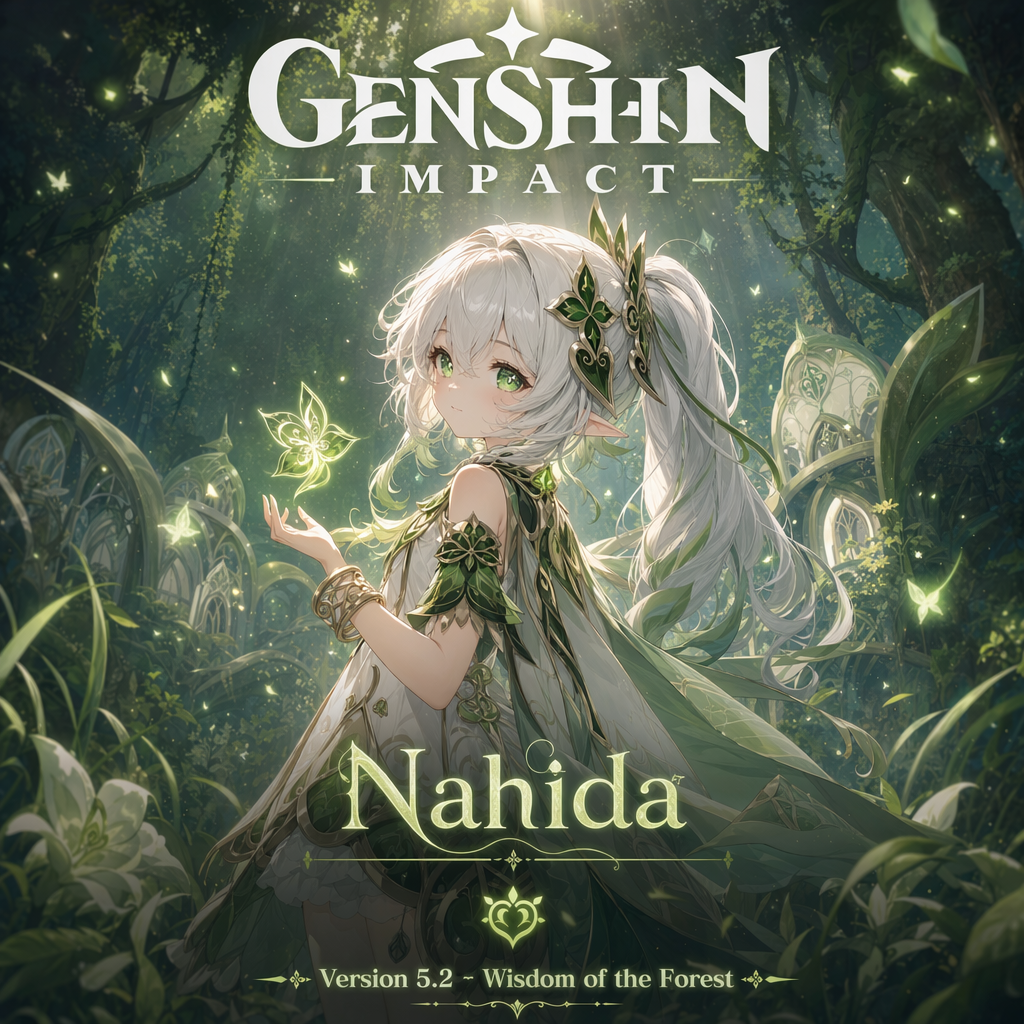
GPT Image 2 delivered a stunning poster with accurate anime aesthetics. The title "GENSHIN IMPACT," character name "Nahida," and version text all rendered correctly. The character design captures the ethereal quality of the game's art style with proper lighting and particle effects.
GPT Image 1.5 result:
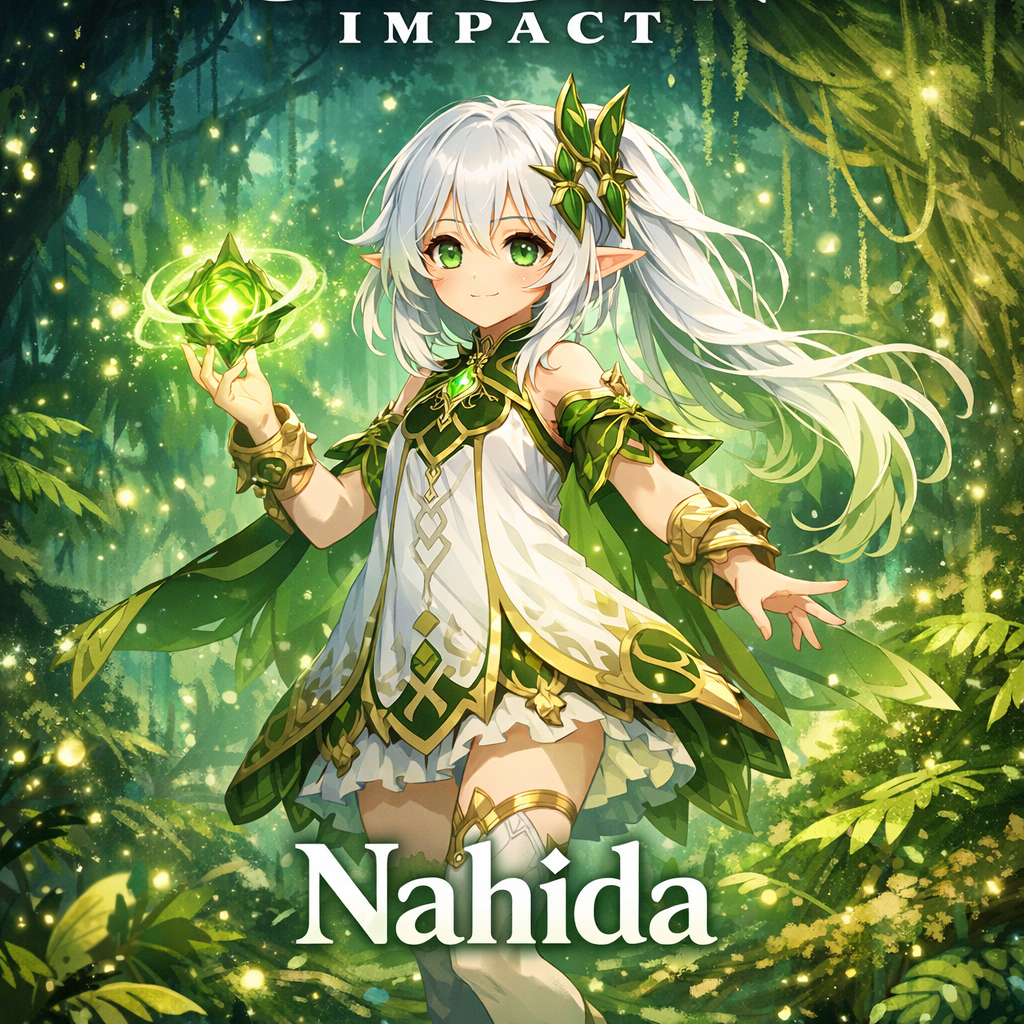
GPT Image 1.5 produced a recognizable anime-style poster but with less refined details. The text rendering is decent but the overall composition lacks the polish and atmospheric depth of the GPT Image 2 version.
SeeDream 4.0 result:
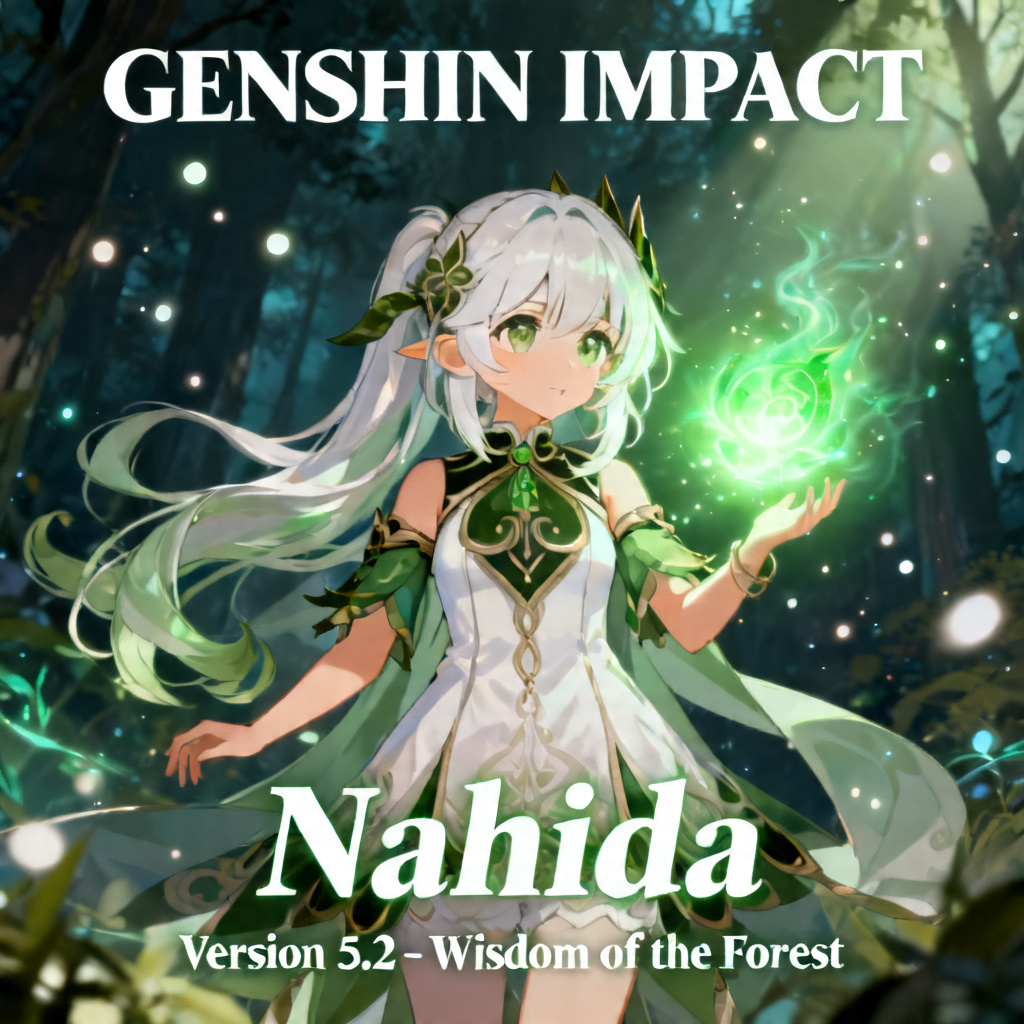
SeeDream 4.0 created an attractive anime illustration with good color palette, but struggled with the text elements — a recurring weakness when handling multiple text layers in a single composition.
GPT Image 2's reasoning step makes a measurable difference. Where competing models occasionally drop words, misspell text, or lose elements from complex prompts, GPT Image 2 consistently delivered complete and accurate results. The gap is most visible in text-heavy prompts — exactly the use cases that matter most for professional applications like marketing materials, UI mockups, and branded content. In the anime poster test, GPT Image 2 also proved it can match artistic quality while maintaining text accuracy — something other models trade off.
The AI image generation landscape in 2026 has several strong contenders. Here is how they stack up:
| Feature | GPT Image 2 | Google Nano Banana 2 | Midjourney V8 | SeedDream 5.0 | Stable Diffusion 3.5 |
|---|---|---|---|---|---|
| Text Rendering | ~99% accuracy, multilingual | Improved, crisp copy | Good for short text | Bilingual CN/EN, decent | Moderate, inconsistent |
| Max Resolution | 4096×4096 (4K) | Up to 4K | Native 2K | 2K | Varies by implementation |
| Speed | 2x faster than predecessor | Flash-speed (fastest) | 5x faster in V8 | Standard | Depends on hardware |
| Style Control | Excellent, reasoning-guided | Good, web-knowledge-powered | Best aesthetic quality | Strong for CN/EN content | Highly customizable via LoRA |
| Pricing | ChatGPT Plus $20/mo, API ~$0.04-0.19/image | Free tier available | $10/mo Standard plan | Via ByteDance API | Free and open-source |
| Multi-Turn Editing | Yes, context-aware | Yes, workflow-based | Limited | Multi-image editing | Via img2img pipelines |
| API Access | OpenAI API, third-party (fal.ai) | Google AI Studio, Vertex AI | Midjourney API (limited) | ByteDance Ark API | Open-source, self-host |
| Best For | Text-heavy, professional, instruction-following | Fast iteration, Google ecosystem | Artistic quality, aesthetics | Chinese/English bilingual | Customization, fine-tuning |
GPT Image 2 vs Google Nano Banana 2: Nano Banana 2 (Gemini 3.1 Flash Image) launched in February 2026 and is the fastest option — built on Flash architecture for near-instant generation. It is free for all Gemini users and has improved text rendering. However, GPT Image 2 leads in complex instruction following and text accuracy, especially for multi-element compositions.
GPT Image 2 vs Midjourney V8: Midjourney remains the aesthetic champion. If your primary goal is cinematic lighting, painterly detail, and character consistency for concept art or illustration, Midjourney V8 is hard to beat. GPT Image 2 wins on text rendering, instruction-following accuracy, and conversational workflow integration.
GPT Image 2 vs SeedDream 5.0: ByteDance's SeedDream excels in bilingual Chinese-English content and has integrated web search into its pipeline. GPT Image 2 offers broader language support and superior text rendering accuracy based on our testing.
GPT Image 2 vs Stable Diffusion 3.5 / Flux: Open-source models offer unmatched customization through fine-tuning and LoRA adapters. If you need full control, local deployment, or NSFW content generation, open-source remains the only option. GPT Image 2 wins on ease of use and out-of-the-box quality.
GPT Image 2's text rendering makes it the first AI image model that can reliably produce marketing materials. Product mockups with accurate labels, social media graphics with legible copy, and ad creatives with branded text are now practical to generate. The multi-turn editing workflow also means you can iterate on designs conversationally — "make the CTA button bigger," "change the headline to our spring sale copy" — without starting from scratch.
The model excels at generating UI mockups, app screenshots, and wireframe-to-visual conversions. It can render realistic mobile app onboarding screens, dashboard layouts, and icon sets with accurate text labels. For product teams, this means faster prototyping without waiting for a designer to create initial concepts.
Infographics, slides, diagrams, and visual explainers are where GPT Image 2 can transform educational content creation. Teachers and content creators can generate accurate visual materials with correct labels, data points, and annotations — something that was unreliable with previous models.
As I demonstrated in the podcast infographic test above, GPT Image 2 can create polished visual summaries of complex topics. Imagine generating a visual study guide for every podcast episode or book chapter you consume.
For artists and illustrators, GPT Image 2 offers a powerful ideation tool. Style transfer between art movements, character consistency across multiple frames, and the ability to iterate on creative concepts through conversation make it valuable for concept art, storyboarding, and visual exploration. As the Genshin Impact poster test showed, GPT Image 2 can produce high-quality anime art that rivals dedicated illustration tools — while still rendering text accurately.
Availability: GPT Image 2 is accessible through ChatGPT for Plus ($20/month), Team, and Enterprise subscribers. API access is available through OpenAI's API and third-party providers like fal.ai.
Pricing: Through ChatGPT, image generation is included in your subscription (with rate limits of approximately 50 images per 3 hours). API pricing varies — OpenAI's direct API is estimated at $0.04-0.19 per image depending on quality and resolution, while third-party providers offer rates as low as $0.01 per image.
Prompting tips for best results:
Understanding the technology behind tools like GPT Image 2 gives you a significant advantage — whether you are using AI for work, learning, or creative projects. The AI landscape moves fast, and staying informed does not mean reading every research paper.
BeFreed transforms the best AI books into concise summaries and AI-powered podcasts you can listen to in minutes. For example, David M. Patel's Artificial Intelligence and Generative AI for Beginners covers the fundamentals of how models like GPT Image 2 work — from neural networks to generative architectures — and has been included in the U.S. Space Command's official reading list.

Comprehensive guide to AI and generative AI for all skill levels.
For a deeper understanding of AI's capabilities and limitations, Melanie Mitchell's Artificial Intelligence: A Guide for Thinking Humans offers a balanced, expert perspective on what machine intelligence can and cannot do.

A captivating exploration of AI's potential and limitations, demystifying the hype and addressing crucial questions about machine intelligence.
You can also listen to the BeFreed podcast "ChatGPT is becoming an AI super app" for a quick deep-dive into how ChatGPT's visual intelligence and reasoning capabilities are evolving — the exact technology powering GPT Image 2.
Explore the capabilities of ChatGPT and the future of generative AI. Learn how OpenAI’s large language models are transforming artificial intelligence today.
GPT Image 2 represents a genuine breakthrough in AI image generation. Its near-perfect text rendering, reasoning-powered generation, and multi-turn editing make it the first model that professionals can rely on for production-quality visual content. While Midjourney V8 still leads in pure aesthetics and Nano Banana 2 offers the fastest generation speeds, GPT Image 2 sets a new standard for accuracy, instruction-following, and versatility.
The business card, infographic, and Genshin Impact poster tests in this article tell the story: when every word matters, GPT Image 2 delivers where other models stumble.

DeepSeek V4 vs GPT-5.5: Which AI Model to Use in 2026
Compare DeepSeek V4 and GPT-5.5 on benchmarks, pricing, and use cases. Find which AI model fits your workflow in 2026.
BeFreed Team

Chat GPT prompts
Effective prompt engineering unlocks the full potential of AI language models, turning basic interactions into powerful tools for problem-solving and content creation. This learning plan benefits professionals, creators, and enthusiasts seeking to leverage AI as a productivity multiplier rather than just a novelty.

Nlp
This learning plan is essential for developers and data scientists looking to master the technology behind modern AI like ChatGPT. It provides a comprehensive path from linguistic foundations to building advanced, production-ready language applications.

The AI Tools Shaping How We Work in 2026
Discover how AI is quietly transforming work in 2026—powering smarter learning, faster creation, and real-world productivity through tools like BeFreed, Runway, and Tenspect.
BeFreed Team

Best TTS Models in 2026: Ranked & Compared
Compare the 8 best TTS models in 2026 — from Fish Audio to ElevenLabs. Find the right AI voice for your project.
BeFreed Team

large language models
As AI reshapes industries, understanding the mechanics of large language models is essential for developers and researchers. This plan bridges the gap between theoretical mathematics and practical deployment, making it ideal for those looking to build responsible and powerful AI systems.

Ai learning
As AI reshapes every industry, understanding its technical core and ethical boundaries is no longer optional. This plan is ideal for professionals and tech enthusiasts who want to transition from passive users to active creators of intelligent systems.

I want to learn about NLP.
This comprehensive path bridges the gap between basic programming and state-of-the-art AI, focusing on the revolutionary transformer architectures that define modern technology. It is ideal for aspiring data scientists and software engineers looking to build sophisticated, language-aware applications.