
书籍
Atomic Habits
James Clear
Comprehensive guide to building good habits and breaking bad ones.

00:00
00:00
Discover the 10 best AI tools for learning and productivity in 2026. From smart task managers to AI book summaries—boost your skills and save hours every week.

Every year, new AI tools reshape how professionals learn and get things done. 2026 is no exception. From smarter task managers to AI-powered writing assistants, the latest crop of tools helps you cut through busywork and focus on what actually matters—building skills, making decisions, and growing your career.
We tested dozens of AI productivity tools and narrowed the list to ten that deliver real results. Here's what made the cut.
Notion AI has evolved from a simple note-taking assistant into a full workspace copilot. In 2026, it can summarize meeting transcripts, generate project briefs from scattered notes, and auto-fill databases based on patterns it detects in your workflow.
The real power shows up in team settings. Notion AI pulls action items from meeting notes and assigns them to the right people. It translates documents for international teams and reformats content for different audiences—turning a technical spec into a client-facing summary with one click.
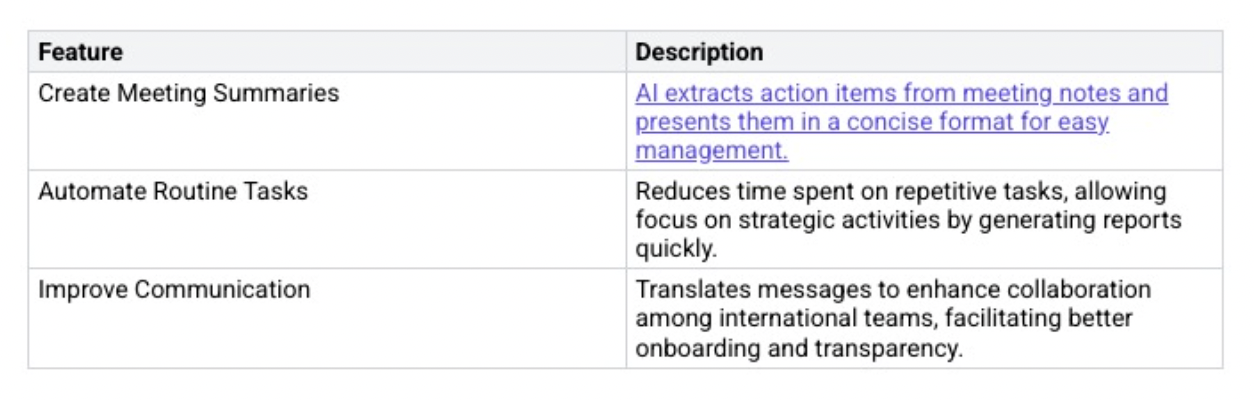
If you spend more than 30 minutes a day on documentation and task tracking, Notion AI pays for itself fast.
Motion combines your to-do list and calendar into a single AI-powered system. Instead of manually scheduling tasks, you tell Motion what needs to get done and by when. The AI analyzes your availability, priorities, and energy patterns, then builds an optimized daily schedule.
When plans change—and they always do—Motion rearranges your entire schedule automatically. A meeting gets moved? Motion shifts your deep work blocks accordingly. A deadline moves up? It reprioritizes everything in seconds.
The 2026 update added team scheduling, so managers can see capacity across their team and distribute work more evenly. For solo professionals, it eliminates the daily "what should I work on next?" decision fatigue.
Reading entire books takes time most professionals don't have. BeFreed AI solves this by turning books into personalized AI podcast summaries. Pick from 50,000+ titles, choose your depth—10, 20, or 40 minutes—and get the key ideas delivered in audio format you can listen to during your commute or workout.
What sets BeFreed apart from other summary apps is the AI podcast format. Instead of reading bullet points, you hear a natural conversation that walks you through the book's core arguments and practical takeaways. Want to go deeper on a specific chapter? The adaptive learning plan feature lets you customize your journey.
Try BeFreed today and turn your dead time into learning time.
ChatGPT has become the Swiss Army knife of AI tools. In 2026, GPT-4o handles everything from explaining quantum computing to drafting a project proposal in your company's voice. The key is knowing how to use it well.
For learning, ChatGPT works best as an on-demand tutor. Ask it to explain a concept three different ways until one clicks. Have it quiz you on material you're studying. Use it to role-play difficult conversations before they happen. Companies like Udacity already use GPT-4 to power virtual tutors that provide personalized learning paths.
For productivity, use ChatGPT to summarize long documents, compare options side-by-side, or generate first drafts you can refine. The time savings compound fast when you use it daily.
Duolingo Max uses AI to turn language learning from a memorization exercise into genuine conversation practice. The standout feature in 2026 is Roleplay—AI characters simulate real-world scenarios like ordering at a restaurant, negotiating a business deal, or navigating an airport in a foreign country.
The AI doesn't just grade your answers. It explains grammar rules, corrects your phrasing, and adapts the difficulty based on your progress. You can ask follow-up questions mid-lesson, just like you would with a human tutor.
With over 40 languages available, Duolingo Max is the most accessible way to build language skills that actually transfer to real conversations.
Want to explore a specific subject across multiple books? BeFreed AI's learning plan feature curates a reading path tailored to your goals. Whether you're diving into leadership, behavioral economics, or personal finance, BeFreed pulls the most relevant books and serves them up as podcast summaries in a logical sequence.
For example, studying productivity? BeFreed might start you with Atomic Habits by James Clear, then move to Deep Work by Cal Newport, building on each book's ideas. Read Atomic Habits on BeFreed to see how it works.
Comprehensive guide to building good habits and breaking bad ones.

Canva Magic Design generates polished layouts from a single text prompt or uploaded image. Need a pitch deck? Describe your topic and Canva produces slide templates with matching fonts, colors, and imagery. Need social media graphics? Upload one photo and get variations sized for every platform.
The 2026 version added brand kit integration—upload your brand guidelines once, and every generated design automatically uses your colors, fonts, and logo placement. For teams that produce content regularly, this alone saves hours per week.
Canva Magic Design works best for people who need professional visuals but don't have design training. The AI handles layout and composition while you focus on the message.
Jasper AI specializes in marketing and brand content. Its "Brand IQ" feature learns your company's voice, tone, and messaging guidelines, then applies them consistently across everything it generates—from email campaigns to social media posts to long-form blog articles.
Here's the typical workflow:
The 2026 "Marketing IQ" update added SEO optimization and A/B headline testing built into the writing flow. If you're producing content at scale, Jasper keeps quality consistent without slowing you down.
Tableau's AI features turn raw data into stories anyone can understand. The "Explain Data" feature highlights why a metric changed—not just that it changed. Click on any data point and Tableau surfaces the contributing factors, ranked by impact.
The 2026 predictive analytics update lets you forecast trends directly inside your dashboards. Ask Tableau a question in plain English—"What will Q3 revenue look like if we increase ad spend by 20%?"—and get a visual answer backed by your historical data.
You don't need to write SQL or build models. Tableau's AI handles the statistical heavy lifting while you focus on what the numbers mean for your business.
Grammarly in 2026 goes beyond grammar and spelling. Its AI now analyzes your entire communication style and suggests adjustments based on your audience. Writing to a CEO? Grammarly tightens your prose and elevates the tone. Messaging a teammate? It keeps things casual and clear.
Key features that save time daily:
For professionals who write dozens of messages a day, Grammarly acts as a second pair of eyes that never gets tired.
Headspace's AI companion Ebb personalizes meditation based on how you're feeling right now. Tell Ebb you're stressed about a deadline, and it suggests a focused breathing exercise. Mention you can't sleep, and it queues a body scan meditation tuned for bedtime.
What makes Ebb different from a static meditation library:
Mental health directly impacts productivity. Headspace with AI helps you manage stress before it manages you.
Otter.ai captures and organizes meeting content in real time, so you can stay present in conversations instead of scrambling to take notes. It integrates with Zoom, Google Meet, and Microsoft Teams, transcribing everything and pulling out action items automatically.
The 2026 update added smart summaries that highlight decisions, questions raised, and next steps—delivered to your inbox minutes after each meeting ends. For client-facing roles, Otter.ai also extracts insights from sales calls and syncs them to your CRM.
Key productivity wins with Otter.ai:
If meetings eat up your calendar, Otter.ai gives you that time back by handling the busywork.
These ten tools represent the best of what AI offers professionals in 2026. The pattern across all of them is the same: they handle repetitive, time-consuming work so you can focus on thinking, creating, and growing.
You don't need all ten. Start with the one or two that address your biggest time sinks. If you're drowning in meetings, try Otter.ai. If you want to learn faster, give BeFreed AI a try. If your writing needs polish, Grammarly is the obvious pick.
The professionals who get ahead aren't necessarily working harder—they're using better tools. These are the tools worth your time in 2026.
Want to go deeper on productivity and personal growth? These books are worth your time:

The Top 7 AI Tools You Should Know in 2026
Discover 7 groundbreaking AI tools transforming learning, productivity, and creativity in 2026.
BeFreed 团队

Best AI Education Apps in 2026
Finding it hard to keep up with new skills? See how the best AI education apps in 2026 help you master any subject faster.
BeFreed Team

10 Benefits of Artificial Intelligence (AI) in 2026
Discover 10 powerful benefits of AI in 2026, from productivity boosts to smarter automation. See how AI is transforming work and life.
BeFreed Team

How to Use AI in Your Work in 2026: Practical, Not Hype
Discover practical, proven ways to use AI in your daily work in 2026—from learning faster and automating tasks to building smarter products and collaborating more effectively.
BeFreed Team

Master AI efficiency and stay current.
As AI reshapes the professional landscape, mastering these tools is no longer optional but a competitive necessity. This plan is ideal for professionals and creators looking to transition from basic AI users to advanced engineers who stay ahead of the curve.

11 Best Book Summary App 2026 (Tested and Reviewed)
Discover the 11 best book summary apps in 2026. Our editorial review highlights features, pricing, and how BeFreed brings AI-powered personalization to learning.
BeFreed Team

Boost Productivity with AI Tools
In an era of rapid digital transformation, mastering AI is no longer optional but a necessity for professional growth. This plan is designed for busy professionals and leaders who want to leverage automation and smart tools to scale their impact.

Master AI Tools Across the Web
As AI reshapes the professional world, mastering these tools is no longer optional but a competitive necessity. This plan is ideal for professionals and leaders looking to boost productivity through advanced automation and strategic AI integration.